If you bought some cryptocurrency and want to turn it back into regular money but aren’t sure how, you’re in luck. Buying crypto is as easy as ever now, but selling it can feel daunting, especially if you are new to the market.
Why sell crypto in the first place? Maybe you made a profit and want to lock it in. Perhaps you need cash for something else or simply want to get rid of a coin you don’t feel confident about. Even if you don’t already own crypto and are considering investing in it, you should know how to sell crypto before you dive in. Whatever your reason, this guide will help you learn how to sell cryptocurrency safely and smartly, including a step-by-step section on selling XRP and an overview of how crypto sales are taxed in the US.
You can check live prices for the coins you hold on our cryptocurrency prices page before you decide to sell.
Best Methods to Sell Cryptocurrencies
Now that you are ready to sell your crypto assets, let’s talk about the main methods. Each of the following methods comes with its pros, cons and transaction fees.
Centralized Cryptocurrency Exchanges
A centralized exchange (often called a CEX) is a website or an app where you can buy and sell crypto. The company that runs the exchange holds your digital assets for you. Think of this as a bank for crypto. You need to trust the exchange to keep your coins safe while you trade.
Centralized cryptocurrency exchanges like Binance, Coinbase and Kraken are very simple to use. Since they are centralized, these platforms usually require you to create an account and verify your identity. The process is called “Know Your Customer” (KYC) and is required by law in most jurisdictions to prevent fraud and money laundering.
Large exchanges like these three have high liquidity. Coinbase, for instance, processes billions of dollars in trades and supports a long list of trading pairs. For traders, this means fast execution and competitive prices.

How to Sell Crypto on a CEX
- Create an account on a trusted exchange like Coinbase or Binance.
- Complete the verification process (ID, proof of address, etc.).
- Deposit your cryptocurrency into the exchange wallet (transfer it from your personal crypto wallet).
- Place a sell order: either at market price (instant) or set your own price (limit order).
- Once your crypto is sold, you can withdraw your fiat money to your bank account.
Fees on Centralized Exchanges
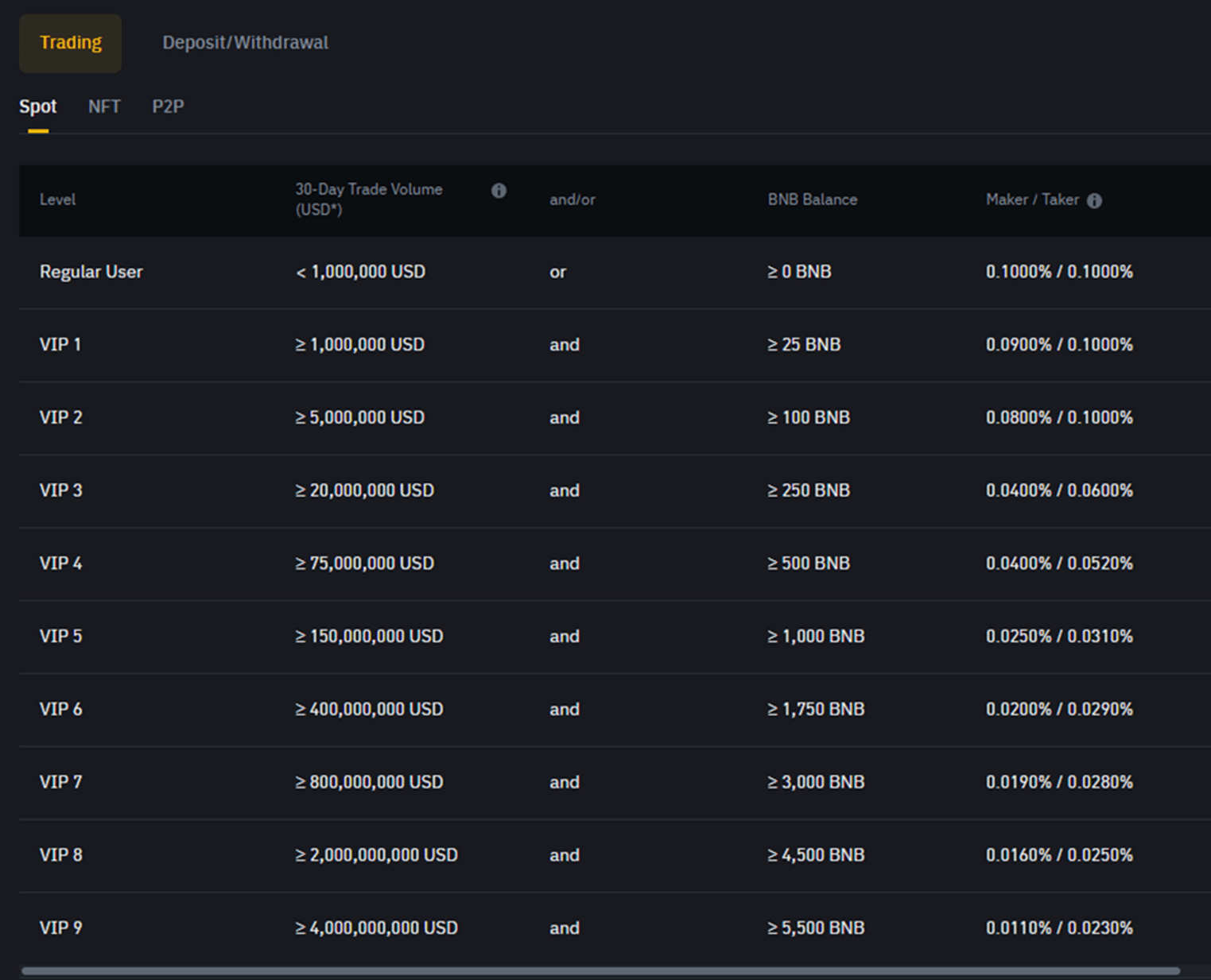
Trading fees on centralized exchanges generally range from 0.1% to 0.6% per trade, but this is not set in stone. Binance, for instance, charges a base 0.1% spot trading fee, one of the lowest in the industry. You can get an even lower fee based on your VIP level on the platform.
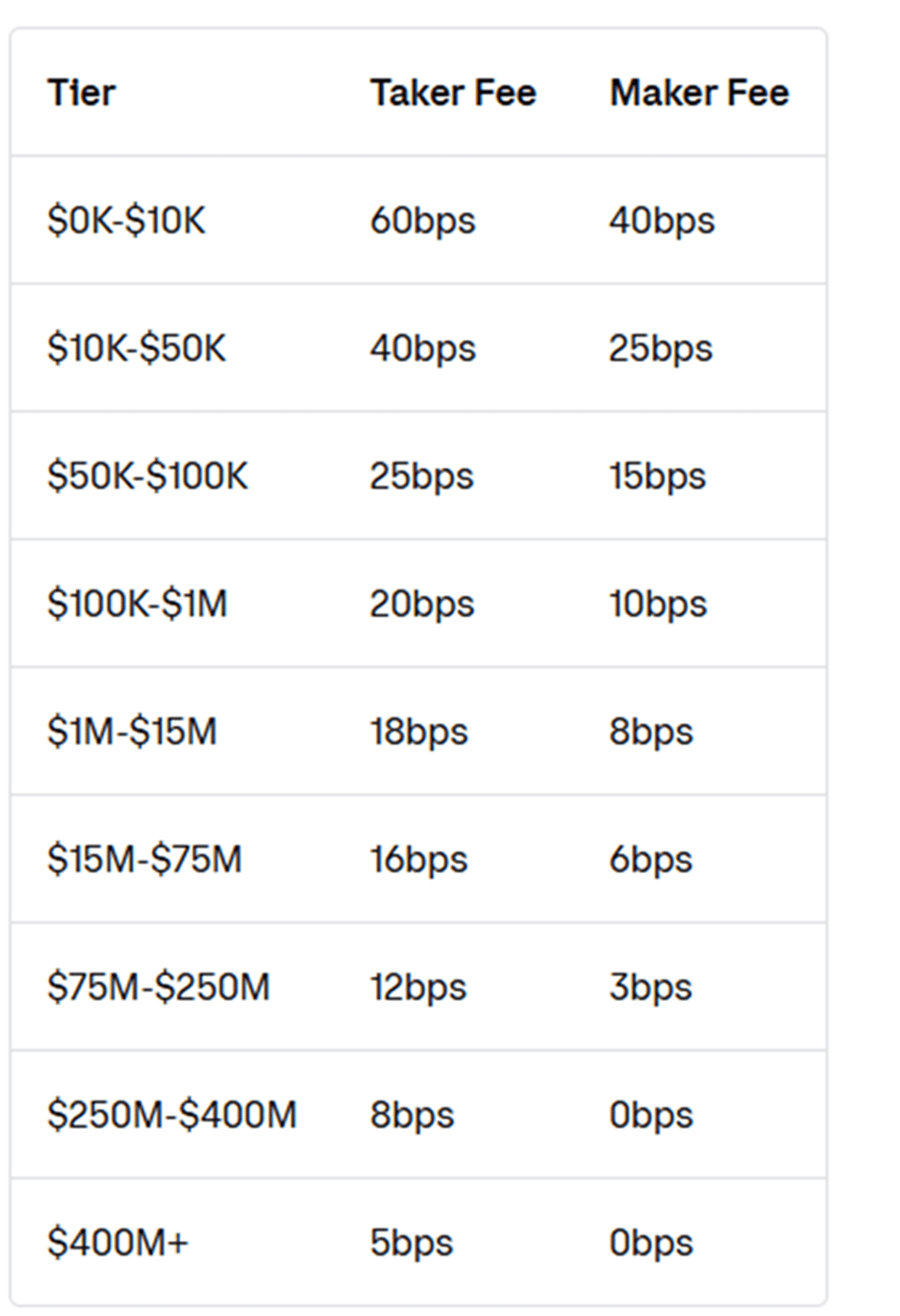
In comparison, Coinbase’s fees can be higher. They depend on whether you are using the main Coinbase platform, the Advanced Trade platform, or Coinbase One. The main platform has fees between 0.5% and 4.5%. In this case, too, the fees change for VIP traders based on their tier.
Withdrawal fees depend on the payment method you choose, as well as the currency. Bank transfers and wire transfers sometimes incur flat fees or small percentages, but every exchange is different, so make sure to check your preferred platform’s fee structure.
Pros and Cons of Using Centralized Exchanges
| Pros | Cons |
| Easy to use, especially for beginners | You must share personal information to use them (KYC) |
| Ability to cash out directly to your bank | You could lose control of your crypto while it’s on the exchange (custodial risk) |
| Regulated platforms with strong security measures, and some offer insurance on part of customer funds | Fees can add up, especially on smaller trades |
| High liquidity on top platforms, which means faster trades | Smaller selection of coins than DEXs |
Decentralized Exchanges (DEX)
A decentralized exchange will allow you to trade cryptocurrencies directly from your own wallet without a middleman holding your funds. On DEXs, trades happen via smart contracts on the blockchain. Popular DEXs include Uniswap (Ethereum) and PancakeSwap (BNB Smart Chain).
Decentralized exchanges only allow crypto-to-crypto trades. This means that you cannot sell your crypto directly for cash. However, you can use a DEX to swap your cryptocurrencies for stablecoins pegged to the US dollar, like USDC or USDT. If you are looking to get fiat for it, you must send your crypto assets to a centralized exchange or use another method.
How to Sell Crypto on a DEX
- Connect a crypto wallet like MetaMask or Trust Wallet to the DEX website of your choice.
- Select the cryptocurrency you want to swap (sell) and the one you want in return (buy). The DEX shows the current rate before you confirm.
- Confirm the swap transaction through your wallet.
- The new crypto arrives in your wallet as soon as the transaction is confirmed on the blockchain.
Fees on Decentralized Exchanges
DEX trading fees typically range from 0.05% to 0.3% per swap, but once again, this is not written in stone. It will depend on the platform and the particular pool you choose. In addition to these fees, you must also pay “gas fees” for every transaction on the blockchain. Gas fees vary based on network traffic and the network you are using.
For instance, Ethereum gas fees spiked to $30+ during the 2021 bull run. During quiet times, they have gone well below $1. You can keep track of gas fees with the Etherscan gas tracker. You should also set your slippage tolerance (often 0.5-2% for large, liquid tokens) before you complete your transaction to limit front running and price slippage.
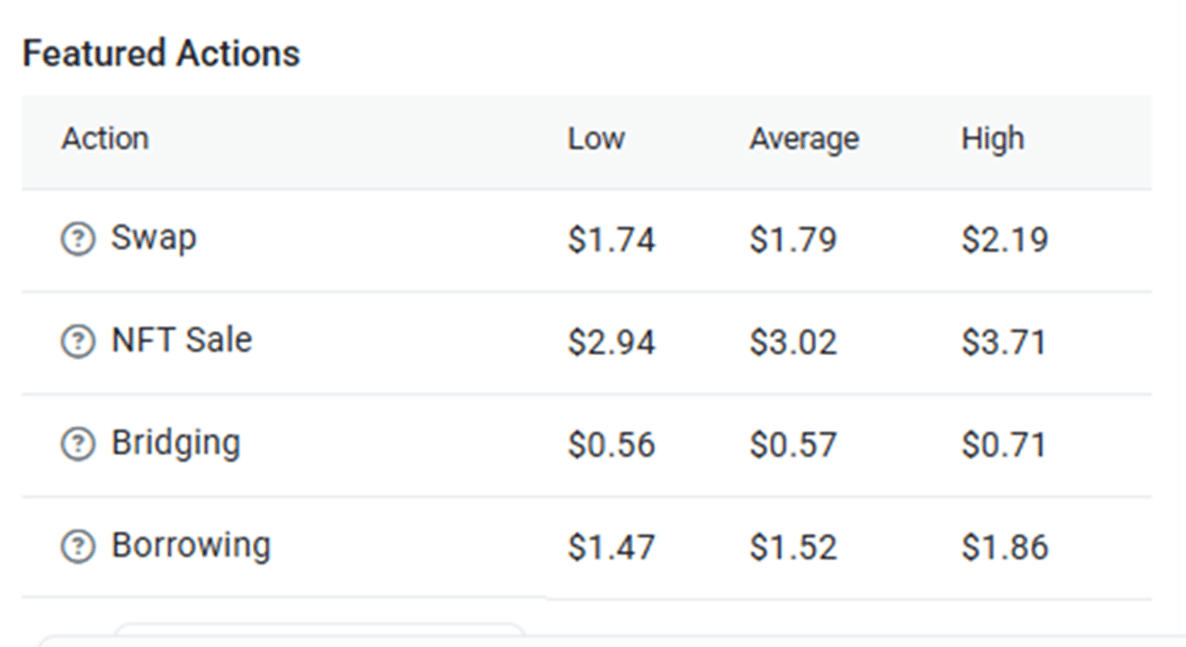
If you are looking for platforms with lower fees, DEXs on BNB Smart Chain such as PancakeSwap, or on Ethereum Layer 2 networks, usually cost a few cents or less per transaction. However, if your coins aren’t already on that network, you will need to use a crypto bridge to transfer them first, which adds its own fees and risks.
Pros and Cons of Using DEXs
| Pros | Cons |
| You keep full control of your crypto, so there is no custodial risk | Can only trade crypto for crypto, no direct cashouts |
| No need for personal ID verification | Gas fees can be high and unpredictable |
| Lower base fees compared to centralized exchanges | Some tokens may have low liquidity, which makes big sales harder |
Brokerages
A cryptocurrency brokerage is a platform that lets you trade crypto directly through its interface without using an order book to interact with other traders, as you would on a traditional exchange.
Think of this as using a currency exchange booth at an airport. You hand over your money, and they give you a set amount of foreign currency at a fixed rate. Crypto brokerages work similarly: they set the price and handle the transaction for you.
Brokerages like eToro, Robinhood and SoFi often combine crypto services with traditional investing tools, which means that you can also trade stocks, ETFs and commodities from the same dashboard.
Some brokerages like eToro allow limited withdrawals to external wallets, while others don’t allow any crypto withdrawals. Robinhood began offering crypto transfers in Europe in 2024.
How to Sell Crypto via a Brokerage
- Open an account with a brokerage that offers crypto trading.
- Buy or deposit cryptocurrency within the app.
- Sell your crypto directly on the platform, converting it into fiat inside your account.
- Withdraw fiat money to your linked bank account.
Fees on Brokerages
Most brokerages charge a commission, a spread, or both. eToro, for instance, has charged a 1% fee when you open and another 1% fee when you close a crypto position. So, if you buy $1,000 worth of Bitcoin, you’ll pay $10 upfront, and when you sell, another $10 or so. Moving crypto out of the platform to an external wallet can cost extra, so check the current fee page before you transfer.
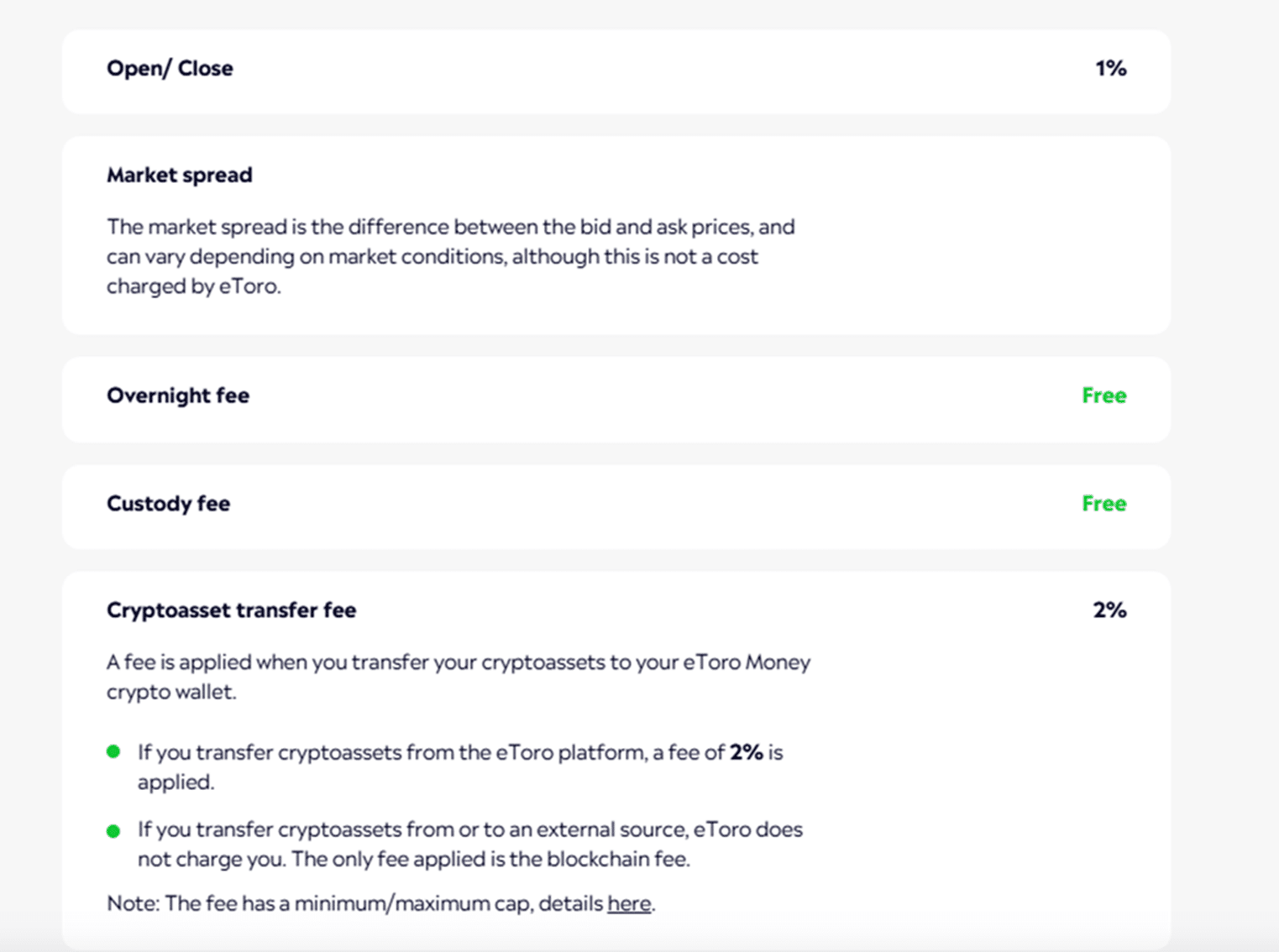
SoFi, which relaunched crypto trading in November 2025, charges a tiered transaction fee that falls as your monthly trading volume rises. Robinhood, on the other hand, charges no commission, but a spread applies.
Pros and Cons of Using Brokerages
| Pros | Cons |
| Simple interface, perfect for beginners and stock traders | Limited to supported cryptocurrencies |
| No need to manage wallets or private keys | On most brokerages, you cannot move crypto out of the platform, only fiat |
| Some brokerages now allow social trading or copy trading | Spreads and withdrawal fees might be hidden |
Cryptocurrency ATMs
A crypto ATM (also known as a Bitcoin ATM or BTM) is a physical machine that lets you buy or sell cryptocurrency using cash or a debit card. This is similar to a regular bank ATM, but instead of withdrawing or depositing fiat money from your bank account, you are exchanging it for cryptocurrency or vice versa.
Some crypto ATMs only support buying crypto, while others allow both buying and selling. Coin ATM Radar tracks tens of thousands of crypto ATMs worldwide, most of them in the United States. The number has fallen in 2026 as regulators tightened rules on ATM operators and some large operators pulled machines, so check that a machine near you is still active before you go.
How to Sell Crypto on a Crypto ATM
- Find a crypto ATM that supports selling (use Coin ATM Radar).
- Choose the sell option and the amount, then scan the QR code the machine shows with your wallet.
- Send the requested amount of crypto to the ATM’s address.
- Collect your cash once the transaction is confirmed (this can take a few minutes, or a redemption code may be issued for later).
Fees on Crypto ATMs
Crypto ATM fees are generally very high, often between 7% and 20% per transaction, which makes them rarely worth using. Also, most ATMs only support Bitcoin and a few other major coins.
Pros and Cons of Using Crypto ATMs
| Pros | Cons |
| Instant cash payout, no bank needed | Very high fees compared to online methods |
| Limited locations, mostly urban areas | |
| Easy for people without bank accounts | A common tool in scams, and physical machines carry security risks |
Peer-to-Peer Trading
Peer-to-peer (P2P) trading lets you sell cryptocurrency directly to another person without using a traditional exchange or brokerage as the middleman. You agree on the price, payment method and terms with the buyer. The transaction goes through a P2P platform, which acts as a middle layer and provides escrow protection, so neither side can simply walk away with the other’s money.
The P2P market has shrunk. LocalBitcoins closed in 2023 and Paxful shut down in November 2025, so most P2P trading now happens on the P2P sections of large exchanges such as Binance P2P.
How to Sell Crypto Using a P2P Platform
- Register on a P2P platform and complete KYC if required.
- List your cryptocurrency for sale, including price and payment methods.
- When a buyer accepts, the platform holds your crypto in escrow.
- After the buyer pays you outside the platform, confirm receipt.
- The crypto is then released to the buyer.
Pro tip: Only release the crypto once the money is actually in your account. Payment screenshots can be faked, and some bank transfers can be reversed.
Fees on P2P
P2P platforms often charge low fees, usually between 0% and 0.5%.
Pros and Cons of Using P2P
| Pros | Cons |
| Many payment options, including local bank transfers and cash | Higher counterparty and fraud risk than an exchange |
| Low or no platform fees | Slower, since you wait for a buyer and for payment to clear |
| Works in regions where exchanges have limited banking access | Fewer platforms since several large P2P marketplaces closed |
Comparison of Methods to Sell Crypto
| Method | What It Is | How You Get Paid | Fees | Advantages | Examples |
| Centralized Exchange | Platform that matches buyers and sellers. You trade through a company. | Direct bank withdrawals | 0.1%-4.5% trading + withdrawal fees | High liquidity, fast trades, supports fiat, easy to use | Coinbase, Binance, Kraken |
| Decentralized Exchange | Peer-to-peer trading via smart contracts, no central authority | Receive another crypto | 0.05%-0.3% + blockchain gas fees | Uniswap, PancakeSwap, 1inch | |
| Brokerage | Platform sets the price for you, like a currency exchange booth | Withdraw to bank account | 1%-2% or more (spread and commissions) | Beginner friendly, no need for wallets, integrates with stocks/ETFs | eToro, Robinhood, SoFi |
| Crypto ATM | Physical kiosk where you buy/sell crypto for cash | Immediate cash payout | 7%-20% per transaction | No bank needed, fast cash, accessible for unbanked users | CoinFlip, BitAccess |
| Peer-to-Peer (P2P) | Direct trading between users, the platform provides escrow for safety | Any method | 0%-0.5%, usually low | More payment options, private, low fees | Binance P2P |
How to Sell Cryptocurrencies With a Centralized Exchange
Now you already know the basics of selling crypto on a centralized exchange. Let’s walk through the process step by step, since this is the most widely used method among crypto holders.
Step 1: Pick the Best Crypto Exchange for You
Exchanges can vary dramatically, so this choice is important. Some are great for beginners, while others offer more advanced tools for pro traders. Some are more expensive, and others come with lower fees or better payment options. Here is what you should consider when choosing the right crypto exchange:
- Reputation and security: Choose well-known, regulated platforms with a good track record (e.g., Coinbase, Kraken, Binance). Look for 2FA, cold storage and, where offered, insurance on held funds.
- Supported countries: Not every exchange is available everywhere. For example, Binance isn’t available in the U.S. (though Binance.US is). Check if the platform supports your location.
- Available cryptocurrencies: Make sure it supports the crypto you want to sell. Some platforms only list popular coins like Bitcoin or Ethereum.
- Ease of use: Beginners may prefer simple interfaces like Coinbase. Advanced traders may want platforms like Binance with more charting tools.
- Withdrawal methods: Can you cash out to your bank? Does it support PayPal, Wise, or debit cards?
- Fees: Look at the trading fees and withdrawal fees. For instance, Coinbase charges up to 4.5% on its basic platform, while Binance is closer to 0.1%.
- KYC: All regulated CEXs will require you to verify your identity, but some may approve accounts faster than others.
- Mobile app: If you plan to trade on your phone, check reviews of the mobile app.
Pro tip: If you are a beginner and want a clean and easy-to-use platform, Coinbase is a common first choice. If you want lower fees and more features, Binance and Kraken are strong choices.
Step 2: Sign Up and Complete KYC
Now that you know which CEX you’ll use, it’s time to create an account. Once you do, the platform will ask you to go through an identity verification process, i.e., KYC. Let’s take Coinbase as an example to learn how to create an account.
First, click on “Sign Up.” Choose between ‘individual’ and ‘business’. Enter your email address or sign up with Google or Apple.
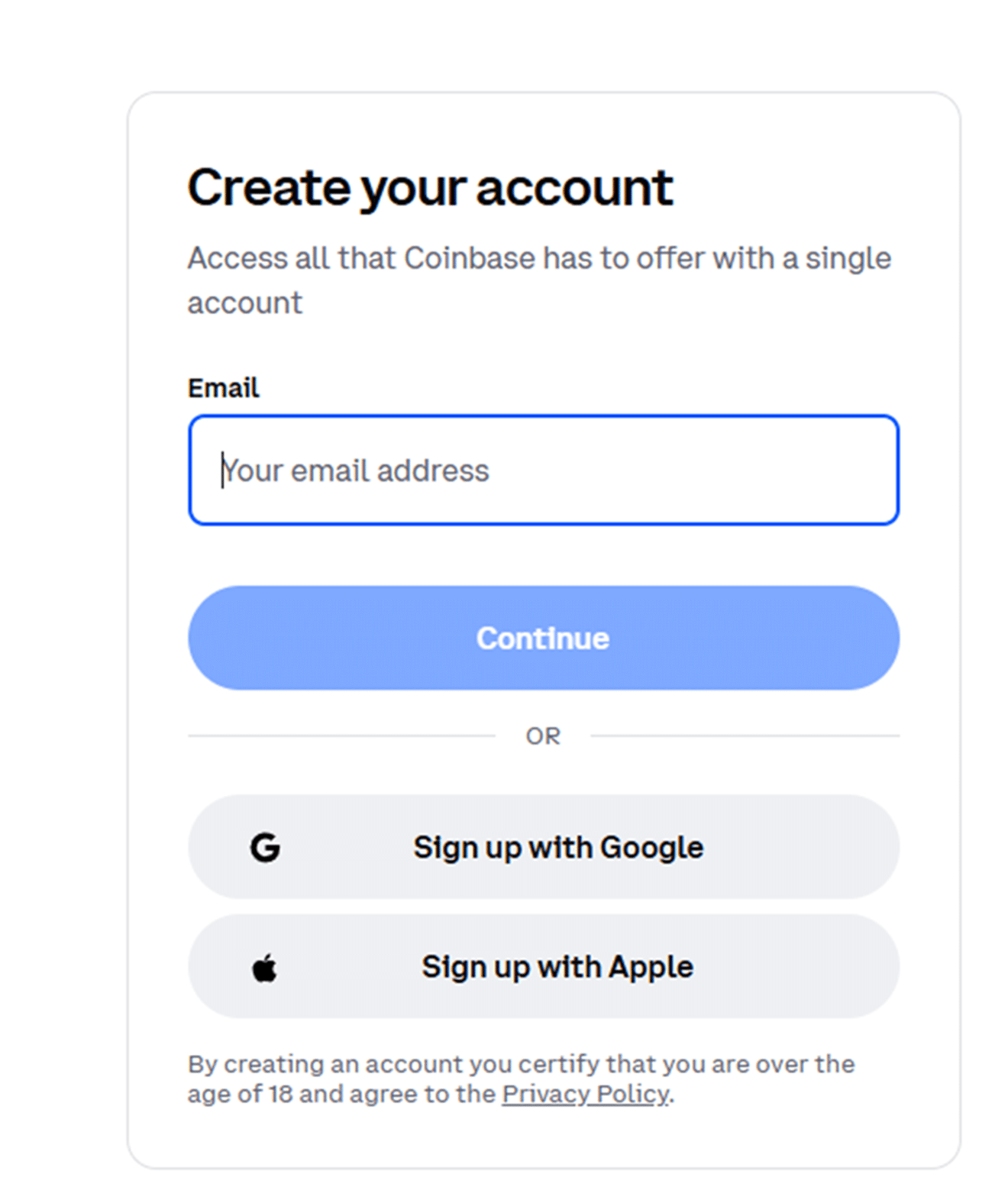
You’ll now receive a verification code at your email address, which you’ll need to enter into the dedicated field. Once you do this, create a password and enter your first and last name, as well as your phone number.
Coinbase is required by financial regulations to collect your personal data to validate your identity. In the US, you need to select your citizenship and validate the last four digits of your Social Security number. Make sure that the personal information you enter matches the details of your government-issued photo ID.
Coinbase accepts different identity documents based on location. You can find this info on their page.
Alternatively, you can download the Coinbase app and create your account there.
Step 3: Deposit or Transfer Crypto to the Exchange Wallet
If you already hold crypto on the exchange, you can skip this step. But if your crypto is stored in a private wallet or a hardware wallet, you need to transfer it to your exchange wallet first.
Simply log in to your exchange account and navigate to the wallet section. Then, do the following:
- Find the crypto you want to sell and click “Deposit” or “Receive.”
- Copy the deposit address provided by the exchange. This is where you’ll send your crypto. Some networks, such as XRP, also need a destination tag or memo (see the XRP section below).
- Open your personal wallet and select the option to send crypto.
- Paste the exchange deposit address, choose the matching blockchain network, and enter the amount.
- Confirm the transaction.
Depending on the network, this can take from a few seconds up to 30+ minutes to arrive.
Pro tip: Always double-check the network and wallet address. If you send crypto to the wrong blockchain or address, it could be lost permanently.
Step 4: Sell Your Crypto
Once your crypto arrives in your exchange wallet, you are ready to sell it. In most cases, you’ll have two options for this:
- Market order: sell instantly at the current price
- Limit order: set your own price and wait for a buyer
Most platforms will show you the fees, the final amount you’ll receive and the exchange rate before you confirm.
Step 5: Withdraw Fiat Currency to Your Bank
Now that you’ve sold your crypto, you are ready to move your fiat balance to your bank. Follow these steps to do it:
- Go to your wallet and click withdraw or cash out
- Choose the amount you wish to withdraw
- Choose your preferred withdrawal method
- Enter your bank details and confirm the transaction
Some exchanges charge a flat fee or a percentage on withdrawals, and the amount depends on the method and your country. SEPA and ACH transfers are usually cheap or free, while wire transfers and PayPal withdrawals tend to cost more, so check the fee schedule before you cash out.
How to Sell XRP
XRP is the native token of the XRP Ledger (XRPL) and one of the most traded cryptocurrencies. The general steps above apply, but XRP has a few quirks you need to know before you sell, mainly the destination tag and the account reserve. You can follow the live XRP price before you decide when to sell. It currently trades at $1.29, with a 24-hour change of −3.0%.
The card below shows XRP’s live price, market cap and trading volume from our data feed.

Where to Sell XRP
XRP is listed on most large exchanges, including Coinbase, Kraken, Binance and Bitstamp. Several large US exchanges suspended XRP trading after the SEC sued Ripple in December 2020. Coinbase, Kraken and Bitstamp relisted it in July 2023, after a federal court ruled that XRP sold to the public on exchanges was not a securities transaction. The SEC case ended in August 2025, when both sides dropped their appeals.
Many brokerages and fintech apps also offer XRP, but availability varies by country, and some brokerages do not let you withdraw XRP to your own wallet. If you want to move your XRP in and out freely, an exchange that supports XRP deposits and withdrawals on the XRP Ledger is the more flexible choice.
The XRP Ledger also has a built-in decentralized exchange, and since March 2024 native automated market maker (AMM) pools. Wallets that connect to the XRPL DEX let you swap XRP for tokens issued on the ledger without a centralized exchange, but just like other DEXs, you cannot cash out to a bank account there.
XRP to Fiat or XRP to a Stablecoin
You have two main ways to sell XRP:
- XRP to fiat: Sell on a pair like XRP/USD or XRP/EUR and withdraw the cash to your bank. This is the route to take if you need the money.
- XRP to a stablecoin: Sell on a pair like XRP/USDT or XRP/USDC to lock in the dollar value while keeping funds on the exchange or in your wallet. Ripple’s own stablecoin, RLUSD, launched in December 2024 and is issued on the XRP Ledger and Ethereum, so it can also be held natively on the XRPL.
Keep in mind that in the US, swapping XRP for a stablecoin is still a taxable disposal, just like selling it for dollars (see the tax section below).
Step-by-Step: Selling XRP on an Exchange
- Open and verify an exchange account that lists XRP and supports withdrawals in your currency.
- Get your XRP deposit details. Go to Deposit, select XRP and make sure the network is the XRP Ledger. Copy both the deposit address and the destination tag (some exchanges call it a memo or tag).
- Send a small test amount first. In your wallet, paste the address, enter the destination tag in its own field, and send a small amount. Wait until it shows in your exchange balance.
- Send the rest. Leave enough XRP in your wallet to cover the account reserve (explained below), plus a tiny amount for fees.
- Place a sell order on XRP/USD, XRP/EUR or a stablecoin pair, using a market order for speed or a limit order for a set price.
- Withdraw your cash to your bank account using the exchange’s withdrawal options.
The Destination Tag: Do Not Skip It
Exchanges usually receive XRP for all their customers at one shared address. The destination tag is a number that tells the exchange which customer to credit. According to the XRP Ledger documentation, without a tag the exchange cannot tell who sent the payment, and recovering it usually means a manual support request. Many exchanges set a flag on their address that makes the XRP Ledger reject any payment that arrives without a destination tag, so your transfer fails rather than disappears.
Always copy the tag exactly, and never reuse an old one without checking. If you are sending to your own personal wallet rather than an exchange, a destination tag is usually not needed.
The XRP Ledger Account Reserve
Every XRP Ledger account must keep a minimum balance, called the reserve, that cannot be sent away. Since December 2024, the base reserve is 1 XRP, plus an owner reserve of 0.2 XRP for each object your account holds, such as a trust line or an open offer. Validators can vote to change these amounts.
This matters in two ways. First, if you try to send your whole balance from a self-custody wallet, the transaction will fail, because the reserve has to stay behind. Second, when you send XRP to a brand-new wallet, the first payment must be at least the base reserve, or the account will not be created.
Storing XRP Before You Sell
If you are not selling straight away, think about where your XRP is held. Exchange wallets are convenient for trading but leave the exchange in control of your keys. Hardware wallets such as Ledger and Trezor support XRP and keep your private keys offline, which is safer for larger amounts you plan to hold. Software wallets that support the XRP Ledger are a middle ground for smaller, everyday amounts. Whatever you choose, write down your recovery phrase on paper or metal, keep it offline, and never share it.
When to Sell
There is no single right time to sell XRP or any other cryptocurrency. What matters is that you decide on a plan before you buy: a target price, a time horizon, or a share of your holdings you will take off the table at certain levels. Then stick to it. Crypto prices are volatile, and decisions made out of fear or greed are rarely good ones.
Some practical rules help:
- Decide your target in advance, and consider selling in parts rather than all at once.
- Do not invest money you will need soon, so you are never forced to sell at a bad time.
- Use limit orders when you do not need an instant fill, to avoid slippage.
- Think about the tax impact. In the US, holding for more than one year can mean a lower rate on any gain.
- Be wary of automated trading bots and “signal” groups. Many are unregulated, and some are outright scams.
Crypto Taxes in the US
If you live in the US, selling crypto usually has tax consequences. The rules below reflect IRS guidance as of 2026. They are a summary, not tax advice, so check the latest IRS digital asset guidance or speak to a tax professional for your own situation.
Crypto Is Property for Federal Tax Purposes
For US federal tax purposes, the IRS treats digital assets, including cryptocurrencies like XRP, Bitcoin and stablecoins, as property, not currency. That means the general rules for property transactions apply. Selling crypto for dollars, swapping one coin for another (including for a stablecoin), and spending crypto on goods or services are all disposals that can trigger a capital gain or loss. Crypto you receive as payment, from mining or as staking rewards is generally taxed as ordinary income at its fair market value when you receive it.
Your gain or loss is the difference between what you received and your cost basis, which is what you paid for the crypto, including fees.
Short-Term vs Long-Term Gains
How long you held the crypto decides the rate:
- Short-term: If you held it for one year or less, the gain is short-term and taxed at your ordinary income tax rate.
- Long-term: If you held it for more than one year, the gain is long-term and taxed at the lower capital gains rates of 0%, 15% or 20%, depending on your taxable income.
The IRS counts the holding period from the day after you acquired the asset up to and including the day you sold it.
Form 1099-DA and Broker Reporting
Brokers, including custodial exchanges, now report crypto sales to the IRS on a new form, Form 1099-DA:
- 2025 transactions: Brokers report the gross proceeds of digital asset sales made on or after January 1, 2025. Cost basis reporting was not required for these sales.
- From 2026: Brokers also report cost basis for “covered” digital assets, meaning assets acquired on or after January 1, 2026 in an account at that broker. For older holdings, or coins transferred in from another wallet, the form shows gross proceeds but the basis may be left blank, so you need your own records.
You report sales on Form 8949 and Schedule D, and every Form 1040 asks whether you received, sold, exchanged or otherwise disposed of a digital asset during the year.
Keep Good Records
Because the IRS receives broker data, your return should match it. Keep a record of the date, amount and dollar value of every purchase, sale, swap and transfer between your own wallets, along with the fees paid. Crypto tax software can import exchange and wallet history and calculate your gains, which is much easier than rebuilding it at tax time.
Outside the US, rules differ widely. Many countries also tax crypto gains, so check your local tax authority’s guidance before you sell.
Conclusion
Selling cryptocurrency for the first time may seem like a confusing process, but it really doesn’t need to be. With your options laid out, you’re in a position to decide which one works best for you.
Each of the methods we described has its strengths. If you want speed and simplicity, a centralized exchange or a brokerage might be your best choice. If you prefer control and privacy, DEXs and P2P trading are a better fit. For quick cash, crypto ATMs are an option (though an expensive one). If you are selling XRP, remember the destination tag and the account reserve.
Just remember to always check the fees, understand the tax impact, and choose a platform that is secure and well-rated. With a bit of care and some research, you’ll be able to cash out your crypto safely and smoothly.
FAQs
What is the easiest way to sell crypto for beginners?
The easiest way is through a centralized exchange. CEXs guide you step by step and pay out to your bank account. Crypto ATMs pay out in cash quickly, but their fees are much higher.
How long does it take to sell crypto and get my money?
This depends on the crypto platform you are using. Centralized exchanges usually take 1-3 business days to pay out fiat. P2P trading may take minutes to hours, depending on the buyer. Crypto ATMs are usually instant or within a few minutes.
What are the typical fees for selling crypto?
This depends on which method you use to sell crypto. CEXs charge 0.1%-4.5%, DEXs charge 0.05%-0.3% plus gas fees, crypto ATMs charge 7%-20%, and P2P platforms charge 0% to 0.5%.
Is selling crypto taxable?
In most countries, yes. In the US, the IRS treats crypto as property, so selling it for fiat, swapping it for another coin or a stablecoin, or spending it is a taxable event, and you report gains and losses on Form 8949. Check your local tax rules or consult a tax professional.
How do I sell XRP for cash?
Send your XRP to an exchange that lists it, such as Coinbase, Kraken, Binance or Bitstamp, including the destination tag the exchange gives you. Sell on an XRP/USD or XRP/EUR pair, then withdraw the cash to your bank account.
What happens if I forget the destination tag when sending XRP to an exchange?
Many exchanges set their address to reject payments without a tag, so the transfer simply fails. If the payment does go through without a tag, the exchange cannot tell which customer to credit, and you will usually need to contact support with the transaction ID to recover it.
Why can't I send my whole XRP balance?
Every XRP Ledger account must keep a reserve. The base reserve is 1 XRP plus 0.2 XRP for each object the account owns, such as a trust line or open offer. That part of your balance cannot be sent while the account is active.
Do I pay tax when I sell XRP?
In the US, yes. XRP is treated as property, so selling it or swapping it for another crypto or a stablecoin can create a capital gain or loss. Gains on XRP held for more than one year qualify for long-term rates of 0%, 15% or 20%; shorter holdings are taxed at ordinary income rates.
References
- Investor Relations and Company Highlights – Coinbase
- Binance Trading Fees – Binance
- Coinbase Trading Fees – Coinbase
- Etherscan Gas Tracker – Etherscan
- Robinhood Introduces Crypto Transfers In EU – Coindesk
- eToro Trading Fees – eToro
- Number of Crypto ATMs Worldwide – Coinatmradar
- Coinbase Accepted Identity Documents – Coinbase Help
- Digital Assets – IRS
- Instructions for Form 1099-DA – IRS
- Topic No. 409, Capital Gains and Losses – IRS
- Source and Destination Tags – XRPL.org
- Lower Reserves Are In Effect – XRPL.org