In this Crypto.com Review, we have deeply explored the platform while laying out its pros and cons. We found that Crypto.com is an ideal platform for both seasoned and new traders who are looking for a wide range of options in a single platform. While this platform offers high-risk and innovative trading options like UpDown, it also offers beginner-friendly trading tools like spot trading.
This is a trusted platform with 100 million global users where users can choose to trade among 400+ cryptocurrencies from 100+ regions. Let’s get into the Crypto.com Review, where we have explored factors such as the platform’s key features, trading options, tools, security, and user experience. We will walk you through the process of getting started with Crypto.com while explaining the methodology we used to review the platform at the end.
Quick Review of Crypto.com
Take a look at the key points this article covers.
- Crypto.com supports 400+ currencies and is available in 100 regions.
- Some regions are restricted, such as Afghanistan and New York, where some specific regions have access to a limited number of features.
- Offers multiple trading options, including spot trading, margin trading, and crypto derivatives like futures and options.
- Trading fees start at 0.075% for spot trading and can be reduced significantly by staking CRO or increasing trading volume.
- Users can acquire Visa prepaid and credit cards with perks like cashback and discounts.
- Crypto.com focuses heavily on strengthening security measures.
- Provides an insurance coverage of up to $250,000 to certain customers, which is unseen in other similar platforms.
- Staking the platform’s native token CRO allows users to reduce trading fees.
Full Crypto.com Review: Key Features Explained
We will review various aspects of Crypto.com, from its trading options, tools, exceptional features, to its geo restrictions.
Trading Options
Crypto.com offers a handful of trading options for traders of all levels. Note that not all options are available in every location; for example, UpDown is only available in the U.S. While this platform offers simple trading options like spot trading and automatic DCA, some options like trading via futures contracts and options-style derivatives are highly risky, especially for beginners. The trading options available in Crypto.com are:
1. Spot Trading
Crypto.com offers spot trading on its app and Crypto.com exchange. In the app, traders can buy or sell cryptocurrencies from about 200-400+ options (varies according to their location) in exchange for fiat currencies (e.g, USD). However, spot trading on the exchange is for more advanced users who want to trade with one another via an order book. They can place orders like:
- Market order
- Limit order
- Stop-loss
- Take-profit
- OCO (One-Cancels-the-Other)
Crypto.com charges competitive spot trading fees starting at 0.075% for both makers and takers at the base level. Users who stake CRO tokens can reduce these fees further, with the potential to reach 0% maker fees at higher staking tiers.
2. Recurring Buys
Users can schedule and automate their crypto buys for fixed intervals using a Dollar-Cost Averaging (DCA) strategy. By spreading buys over time, people can reduce volatility. This is good for long-term investments but not entirely risk-free, just like any other cryptocurrency trading strategy. For example, someone could schedule automatic purchases of $25 worth of BTC every Sunday. The platform will automatically buy that amount of BTC on the desired day, no matter the price.
3. Margin Trading
One of the highly risky trading methods is where users can borrow assets to invest in more crypto. However, they need to deposit the crypto they own as collateral according to the platform’s requirement. For instance, a trader might borrow an extra $100 worth of BTC by depositing $80 worth of their own BTC as collateral. Now, using the total of $180 BTC, they buy more crypto. Users can face losses and even lose their entire collateral if the purchased crypto’s value falls. Margin trading follows the same spot trading fee schedule. Additionally, borrowers pay daily interest on borrowed funds. A 0.5% liquidation fee applies if positions are forcibly closed.
4. Perpetual & Futures Contracts
Crypto.com also allows users to trade Perpetual and Future contracts. Here, a collateral amount is also needed to create a margin balance. Although this type of trading doesn’t offer true ownership, users can easily short-sell, earn higher returns with leverage, and avoid the hassles of owning crypto directly. Derivatives trading fees start at 0.034% for takers and 0.017% for makers at the base level, lower than spot trading rates. These fees decrease further based on trading volume and CRO staking.
5. UpDown & Strike Options via CDNA
Users need to create an account in the Crypto.com App to trade via UpDown and Strike options. UpDown allows users to gain profit by predicting a coin’s price movement. For instance, a trader buys an UpDown contract predicting that Bitcoin will reach a certain price by a specific date. If it turns out to be correct, the user will receive a profit; if not, they will lose the contract money. Strike options, on the other hand, are more complicated and similar to traditional trading. Here, the user trades cryptocurrencies based on specific conditions and a strike price.
6. DeFi Trading
Crypto.com allows on-chain trading through its self-custodial wallet – Crypto.com Onchain. Here, users can access the decentralized exchanges (DEXes) and trade cryptocurrencies on the blockchain directly.
Trading Tools
Crypto.com integrates with TradingView, allowing traders to access real-time market insights and help make data-driven decisions. It also enables crypto holders to stake their CRO and other holdings and participate in DeFi pools to earn staking yields. This platform gives users access to a range of trading bots, including DCA Bot, TWAP Bot, and Grid Bot.
Customers can also automate trading using its app by leveraging Crypto.com’s Target Price Orders, Recurring Buy, and Dollar Cost Averaging (DCA) features.
Supported Assets
Crypto.com supports at least 100 pairs of fiat-to-crypto and crypto-to-crypto trades. Some of the major cryptocurrencies that Crypto.com supports include:
- Bitcoin (BTC)
- Ethereum (ETH)
- Binance Coin (BNB)
- Ripple (XRP)
- Cardano (ADA)
- Solana (SOL)
- Polkadot (DOT)
- Dogecoin (DOGE)
- Litecoin (LTC)
- Chainlink (LINK)
- Shiba Inu (SHIB)
- Avalanche (AVAX)
Crypto.com Credit and Visa Cards
This platform presents debit and credit card facilities with Visa cards. Crypto.com’s prepaid Visa card and the Visa Signature® Credit Card come with various tiers. You can fund the prepaid cards using your crypto or fiat and use them like a regular card.
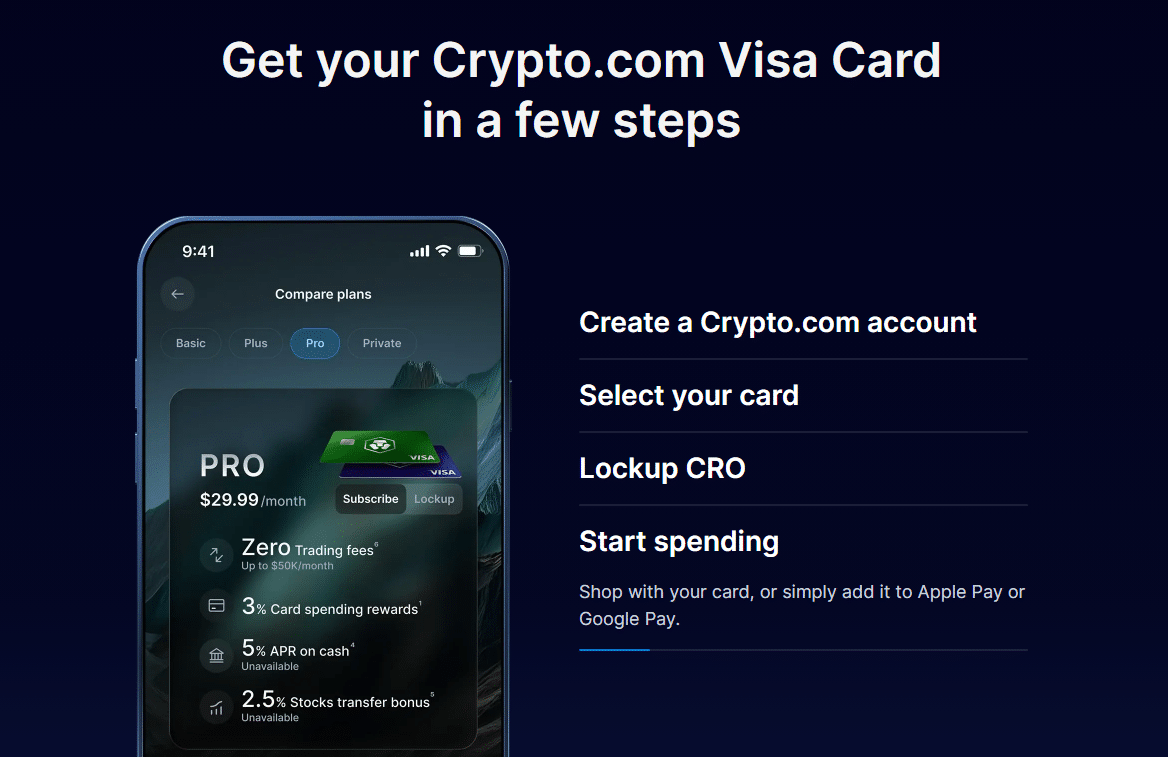
Depending on the tiers, users can enjoy a variety of perks like receiving CRO cashbacks, free withdrawals, discounts on subscriptions, etc. The Visa Signature card is like any other credit card. Users do not need to stake any CRO when using the basic Midnight Blue tier. But the other tier requires them to lock CRO for about 365 days before they qualify.
How to Sign Up for a Crypto.com Visa Card
- Start by downloading the Crypto.com app
- Open an account and undergo the KYC verification
- Next, select the tier option of the card you want
- Freeze the required amount of CRO (except for the free Midnight Blue tier) for about 12 months.
- After locking your tokens, the application will be reviewed and approved by Crypto.com to use your card.
- Once issued, fund your prepaid cards to use them.
Cronos (CRO) Features
CRO, or Cronos, is the native token of the Cronos ecosystem, used to support all processes within the system, including transaction fees, staking, lending, and trading. Even Crypto.com Visa cardholders receive CRO as rewards or cashback. The Cronos ecosystem is a combination of Cronos EVM, Cosmos SDK, and Cronos POS – three decentralized, open-source blockchains designed to power the next-gen Web3 applications.
Some investors may show interest in CRO for its low transaction fees. Some may also find it a valuable investment opportunity because of its link to the DeFi and Web3 ecosystems, which are likely to boom in the near future. This token is also an integral part of Crypto.com, which is growing rapidly, becoming a hub of 100 million global users, where its total userbase has grown to 659 million from 583 million as per Crypto.com’s December 2024 data.
Supported Regions
Crypto.com app is available in 100+ global markets, including 49 U.S. states, such as:
- Washington, D.C.
- Puerto Rico
- Virgin Islands
- American Samoa
- Northern Mariana Islands
However, U.S. customers cannot access Crypto.com’s Visa Card service. People accessing from New York can’t utilize the app either. The Web version is available in many European countries, including Germany, the Netherlands, Switzerland, Belgium, Ireland, etc. The platform also supports users from Canada, Singapore, the United Kingdom, India, and in some particular U.S. states.
Some of the major restricted regions are:
- China
- Bangladesh
- Russia
- Iran
- Iraq
- North Korea
- Syria
- Cuba
- Afghanistan
- Some regions of Ukraine
- Many parts of Africa, the Middle East, and small island nations.
User Experience and Interface
Crypto.com offers a mobile app and a web UI with a comprehensive suite of tools and services. If you compare it to Binance and Kraken, it’s less complex and more beginner-friendly. However, Crypto.com also lacks some advanced UI and UX features, according to some Reddit users.
The mobile app is designed to serve both new and experienced traders, with a rating between 4.0 and 4.7 on the Apple App Store and Google Play Store. Users praise its user-friendly design, but some express doubts about trading costs and service availability during support hours. Users must complete email verification and phone confirmation,and submit KYC documents, which typically include a selfie and an image of a government-issued ID, to access the platform. The mobile application focuses on basic functionality, which makes the web platform a bit more suitable for traders who need advanced charting tools and complex trading methods.
Some users find that Crypto.com’s spread is too large compared to Coinbase or Kraken. Many complained about excessive pop-up ads and notifications. Some believe the verification process of sending crypto to a wallet should be less redundant or cumbersome, as users may need to go through multiple fingerprint verifications.
Crypto.com Security Features
Crypto.com implements Zero Trust and Defense in Depth to secure users’ data privacy across its systems and platforms. The platform invests in regular staff training to make them more aware of security and privacy. To protect customers’ virtual assets, they store them in institutional-grade reserve accounts and also apply strict controls on access rights to funds in their wallets.
All software undergoes peer review when it’s in the development stage to identify vulnerabilities and prevent security concerns. Like the other crypto platforms, Crypto.com ensures security with features like Passkeys, HSMs, and FIDO2, password, biometric, withdrawal protection, and authenticator codes.
Crypto.com offers the Account Protection Program (APP), ensuring users get up to U.S. $250,000 if their eligible account gets compromised. This security feature is unseen in reputable platforms like Binance and Kraken. It shows how much confidence Crypto.com puts into security measures. While Binance and Crypto.com implement Phishing Codes in their emails, Kraken has no such features; instead, it uses PGP email encryption.
Crypto.com Customer Support
Users can reach the customer support team via various options. Users can email contact@crypto.com for support. Traders can contact the support team from the in-app chat options or visit https://chat.crypto.com/ to explore common FAQs or ask questions to their AI-powered assistant.
The speed of customer service responses depends on the chosen support method, with live chat generally operating at a faster pace than email support. User reviews on Trustpilot report inconsistent customer experiences due to delayed responses during peak times, while many found support staff to be helpful overall. The support features at Crypto.com generally match those of Coinbase and Binance, but the platform does not provide phone support, which some users needed for immediate account problems.
Pros and Cons of Crypto.com
Crypto.com is one of the largest and popular crypto platforms, offering many advantages. However, the platform also has drawbacks that should be weighed against the positives.
Crypto.com Pros
- Wide range of coins: Crypto.com provides over 400 cryptocurrencies, including popular options like Bitcoin (BTC), Ethereum (ETH), and various altcoins and stablecoins.
- Visa card: Allows customers to use Visa cards and fund them with their choice of crypto or fiat. With prepaid cards, they also offer a Visa credit card.
- Fee discounts: Users who stake CRO, the platform’s native token, can trade for a significantly lower fee.
- Mobile app: Crypto.com has a dedicated app for both Android and iOS users, where they can buy, sell, and manage their cryptocurrencies with ease.
- Robust security features: Offers standout security features like 1:1 reserve backing, multi-factor authentication (MFA), multi-signature (multisig) support, and many more.
Crypto.com Cons
- High spread: Although the fees are competitive, many users complain about its high spread on crypto purchases.
- Geo-restrictions: Restricted in many countries, including Afghanistan and China. Available in some U.S. states but not accessible in New York.
- Complex verification process: The verification process might seem way too complex and lengthy to some users because of its multiple verification requests.
How to Start Trading With Crypto.com
Crypto.com offers a mobile app allowing you to trade on the go. You can fund your account with both cryptocurrency and fiat currency to start trading. The entire process is broken down below.
1. Download Crypto.com and Sign Up
Visit the Crypto.com official website and click on the ‘Download App’ button. You can also download the app on your phone through the Apple App Store or Google Play Store. Once the app is downloaded, sign up to create an account if you do not have one already.

2. Verify Your Identity
The platform may ask you to verify your identity with a KYC verification process. You might need to fill in your first and last name, nationality, date of birth, and email. They may also ask you to enter your mobile number to receive a one-time passcode (OTP) and submit your ID and photo.
3. Deposit Funds and Get Started Trading
You can deposit funds either fiat or crypto using bank transfers, credit or debit cards, Apple Pay, or Google Pay. Crypto.com also allows depositing crypto from external wallets. Note that you need to fund your Crypto.com account from your accounts or crypto wallets that are registered in your name. Transfers from someone else’s account or third-party payment methods like Western Union, Wise, or PayPal are typically not accepted.

Crypto.com does not charge deposit fees for cryptocurrency transfers or ACH bank transfers. However, credit and debit card deposits typically incur fees. Withdrawal fees vary by cryptocurrency and network – for example, Bitcoin withdrawals cost approximately 0.0004-0.0006 BTC depending on the network, while choosing different networks can result in significantly different fee amounts.
Never try to deposit a token that is not supported by the platform, as it will likely lead to a loss of tokens. It’s recommended to transfer a small amount of crypto first in order to make sure the process works. On the app, tap on Deposit, then Crypto to select the token you want to deposit. Now, complete your deposit with the provided deposit address or QR code that appears next.
If you want to fund with fiat currency from your bank account, go and click on Deposit and then select Cash on the app. Now go to your online bank app or portal, and create a new payee. Next, enter the bank transfer details to transfer funds to your Crypto.com account.
Our Methodology: How We Reviewed Crypto.com
We studied various aspects of Crypto.com to create this comprehensive Crypto.com exchange review. Let’s explore how we did our research and what factors we examined that led to the overall understanding of the platform.
Trading Options and Coin Selection (30%)
We examined the types of trading options this crypto platform offers. The guide discusses spot trading, margin trading, and derivative options offered by the Crypto.com app and the exchange. We also evaluated the number of cryptocurrencies it supports, whether it has popular cryptocurrencies, and other options like trading pairs.
Security Features (25%)
Since we are reviewing a crypto exchange platform, we carefully examined its security features. We evaluated the platform’s commitment to security and whether it offers any unique options that are not yet offered by Crypto.com alternatives, such as Binance and Kraken.
Fees and Costs (20%)
We evaluated its fees, staking bonuses, and costs to find out whether this platform offers competitive pricing and how much it costs to fund the user’s account before trading. We also examined the costs associated with different trading strategies.
Customer Service and User Experience (15%)
We looked at the platform’s UI and UX, and read through real customer feedback on platforms like Reddit. We also tried to find out whether it has a mobile app or any other beginner-friendly features that the competitors offer. Moreover, we evaluated whether they offer sufficient customer support options to help users clear their queries and share concerns with the Crypto.com customer support.
Geo-Restrictions and Regional Availability (10%)
Finally, we evaluated the geo-restrictions of this platform. We separately looked at the regional availability of the platform’s app, web interface, Visa card, or other features.
Is Crypto.com the Best Exchange For You?
In our analysis, we decided that Crypto.com is a strong choice for beginners and advanced traders and investors alike. The easy-to-use mobile app and trading tools like recurring buys and dollar-cost averaging (DCA) make it highly suitable for beginners. However, it also offers complex, high-risk, high-return features for experienced traders, including margin trading, crypto futures, and options contracts.
No matter how low or high the risk is, all traders and investors should know that crypto trading is never 100% risk-free, and they should always do their own research before delving into trading.
While Crypto.com offers a wide selection of coins to buy and sell, advanced security, and tempting staking options, investors should also review the downsides. Find out whether it is available in your region or which features you can access. Investors should look at the Crypto.com fees and compare them with those of other exchanges before deciding to get started with Crypto.com.
FAQs
Is Crypto.com safe to use?
Does Crypto.com require KYC?
Does Crypto.com offer fiat deposits and withdrawals?
Is Crypto.com better than Coinbase?
References
- Compare Card Tiers – Crypto.com
- Dollar-Cost Averaging (DCA): What It Is, How It Works, and Example– Investopedia
- What is CRO? Everything you need to know – Crypto.com
- Which are the Available Markets? – Crypto.com
- Where is Crypto.com Web available? – Crypto.com
- Crypto.com App Geo-Restrictions – Crypto.com
- Security – Crypto.com
- Account Verification – Crypto.com
- How to Deposit Crypto into the Crypto.com App/Web – Crypto.com
- EUR Deposit by Bank Transfer – Crypto.com