Join Our Telegram channel to stay up to date on breaking news coverage
Every crypto holder knows the anxiety of managing their recovery phrase. You’re looking at those 24 words, double-checking if you wrote “6” or “G,” knowing that one small mistake could lock you out of your wallet forever.
A single transcription error, a house fire, or just losing that piece of paper means your crypto is gone for good. The problem is that traditional recovery phrases create a single point of failure.
Today, Ledger is tackling this problem head-on with Recovery Key — a PIN-protected physical backup that works alongside your existing recovery phrase. It’s designed for Ledger Flex and Stax users who want a safety net without the stress. With Recovery Key, restoring your wallet is as simple as one tap on your device.
Below, we’ll walk through how Recovery Key actually works, what it costs, and whether this spare key approach finally makes self-custody less stressful.
Ledger’s New Recovery Key Provides Offline Backup for Hardware Wallets
Every crypto holder knows the anxiety of managing their recovery phrase. You’re looking at those 24 words, double-checking if you wrote “6” or “G,” knowing that one small mistake could lock you out of your wallet forever.
A single transcription error, a house fire, or just losing that piece of paper means your crypto is gone for good. The problem is that traditional recovery phrases create a single point of failure.
Today, Ledger is tackling this problem head-on with Recovery Key — a PIN-protected physical backup that works alongside your existing recovery phrase. It’s designed for Ledger Flex and Stax users who want a safety net without the stress. With Recovery Key, restoring your wallet is as simple as one tap on your device.
Below, we’ll walk through how Recovery Key actually works, what it costs, and whether this spare key approach finally makes self-custody less stressful.
What is a Ledger Recovery Key?
Ledger Recovery Key is a physical backup card that stores an encrypted copy of your 24-word Secret Recovery Phrase.
The device looks like a credit card but comes with powerful security tech inside. It’s built with the same Secure Element chip technology found in Ledger hardware wallets, along with its own operating system that handles all the cryptographic operations.
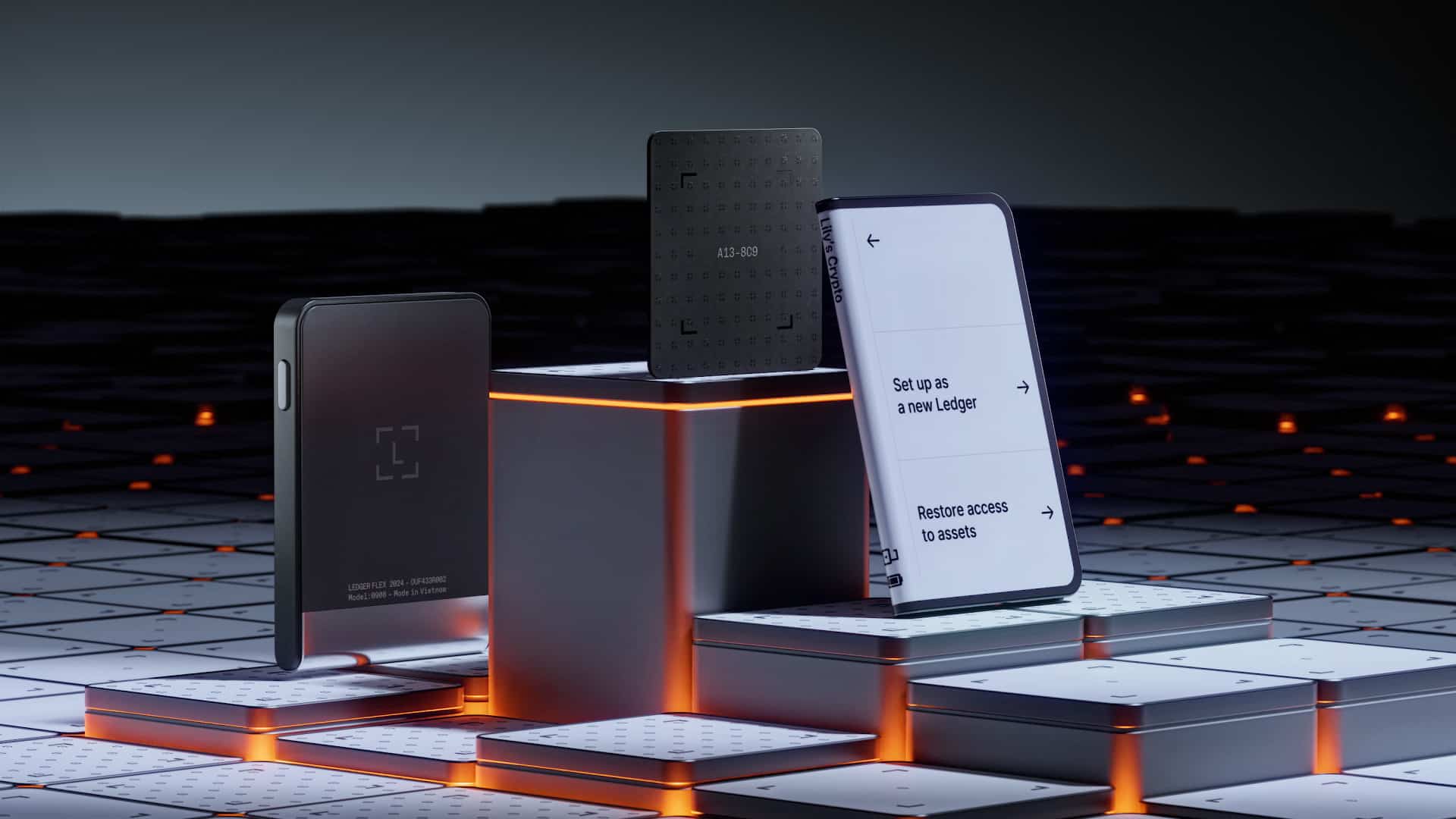
The Recovery Key connects to your Ledger Flex or Stax device using NFC. Everything happens offline with no internet connection, cloud storage, or third-party services involved. Only you can create and use the backup by physically confirming it on your Ledger device.
The Recovery Key stores your encrypted backup in its Secure Element chip, so it’s protected by a custom PIN and the same cryptographic standards that make Ledger devices trusted by millions.
There’s no identity verification and the Recovery Key collects zero personal data.
Note: Recovery Key is not a seedless wallet solution. You maintain complete control of your Secret Recovery Phrase at all times.
How to Set Up and Use Your Ledger Recovery Key – Step-by-Step Guide
Setting up the Recovery Key takes just a few minutes and happens entirely through your Ledger device’s display.
Here’s how you can create your backup:
- Make sure your Ledger Flex or Stax is ready and NFC is enabled
- Navigate to Settings > Ledger Recovery Key from your device’s home screen
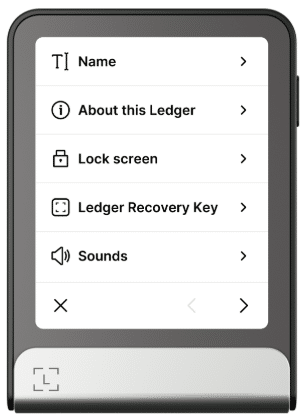
- Hold the Recovery Key against the back of your device until the loading bar appears
- Tap “Start setup” and re-enter your Ledger device PIN
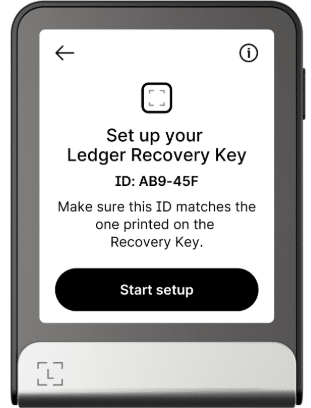
- Read the on-screen instructions and tap “I understand”
- Choose a PIN between 4-8 digits for your Recovery Key
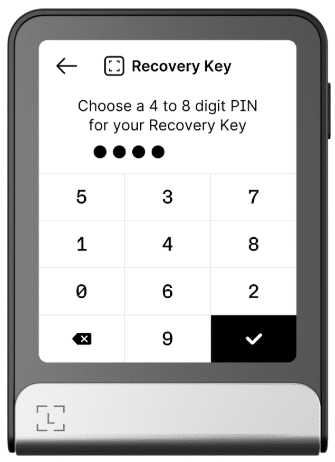
- Confirm your PIN by entering it again
- Hold the Recovery Key against your device one final time to complete the backup
And here’s how to restore your wallet:
- Power on your Ledger device and navigate through the initial setup screens
- Choose whether to set up with Ledger Live Mobile or Desktop and follow the prompts
- Give your device a unique name and choose a PIN between 4-8 digits
- When prompted to restore access, select “Restore access to assets” > “Ledger Recovery Key”
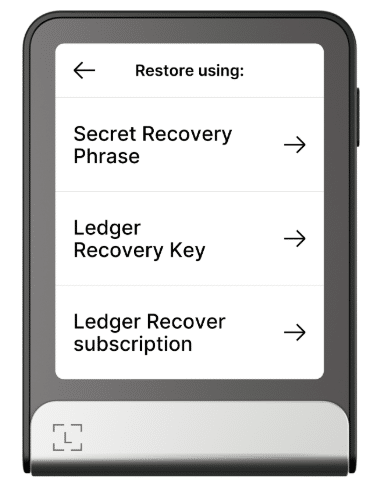
- Read the on-screen instructions and tap “I understand”
- Hold the Recovery Key against the back of your device until the loading bar appears
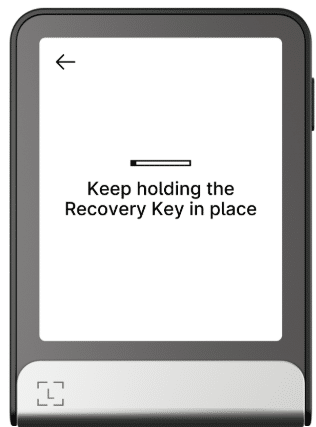
- Tap “Start restore” and enter your Recovery Key PIN
- Hold the Recovery Key against your device one final time to complete the restoration
The entire process removes the anxiety of manually entering 24 words and still gives you complete control. No cloud services, no third parties, no identity verification. You own the backup process from start to finish, but without the complexity and error-prone nature of traditional seed phrase recovery.
Pricing, Availability, and Support for Existing Customers
Ledger Recovery Key officially launched on July 24, 2025. From that date, it will be included at no additional cost with every purchase of a Ledger Flex or Ledger Stax.
For users who want additional backups or prefer to buy it on its own, the Recovery Key is also available as a standalone product for $39 via Ledger.com.
There’s also the 3-pack bundle that gives 15% off for people who want more comprehensive backup systems.
If you purchased a Ledger Flex or Ledger Stax before the Recovery Key launch, Ledger is offering a complimentary Recovery Key as a thank-you to early adopters. The key itself is free, you’ll only have to cover the discounted shipping fees. This offer is available until August 30.
Ledger Recovery Key vs. Traditional Backups: What’s New?
Recovery Key adds several layers of protection that paper backups can’t match. PIN protection means your backup stays secure even if someone finds it.
The Secure Element chip provides bank-level encryption, and the one-tap setup removes transcription errors. Most importantly, it stays completely offline and sidesteps traditional paper’s durability issues.
Don’t throw away your paper backup though, that’s still your master key. Think of the Recovery Key as adding a second key to your house instead of changing the locks entirely.
Here’s a quick comparison of the benefits:
| Feature | Paper Backup | Recovery Key |
|---|---|---|
| Protection | None (readable by anyone) | PIN + hardware encryption |
| Durability | Degrades over time | Built to last decades |
| Setup | Manual transcription | One-tap process |
| Recovery | Type 24 words carefully | Tap card + enter PIN |
| Error risk | High | Minimal (automated process) |
| Offline storage | ✓ | ✓ |
| Third-party dependency | None | None |
Final Words
Recovery Key solves a problem that shouldn’t exist in 2025, and that’s protecting digital assets with analog methods.
The device adds PIN protection and hardware encryption to something that used to be completely unprotected. Instead of hoping your handwriting stays readable, you tap a card and enter a code.
Visit Ledger’s official website to learn more about Recovery Key and see if it fits your setup.
Join Our Telegram channel to stay up to date on breaking news coverage